Show Build-Information in your iOS App About Panel
Build . iOSSometimes it might be useful to have an exact piece of information about what version of an app you have currently running. Especially if you have a decent Testing-Group, it is important to track the versions in which a bug appears. The goal of this post is to achieve a info panel like this in your application.
You get the Application version (from the Application Bundle), the Repository Revision and the Date of the last Commit.
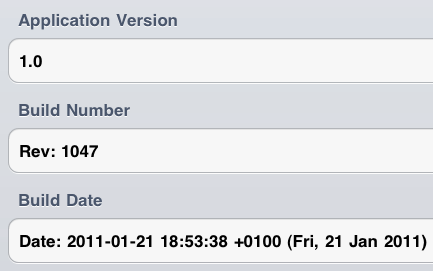
Picture 1: Example Application About Dialog
We are using here the build-in functions of subversion to update given keywords with the repository information. More about this topic here. There is also a way to use this method with git, but i did not test it yet. You may find out more about this here
The first step is to create a File-Template you can import in your code, with which you can access all the necessary details:
#define APP_VERSION
[[[NSBundle mainBundle] infoDictionary]
objectForKey:@"CFBundleVersion"]
#define APP_EXECUTABLE
[[[NSBundle mainBundle] infoDictionary]
objectForKey:@"CFBundleExecutable"]
#define APP_NAME
[[[NSBundle mainBundle] infoDictionary]
objectForKey:@"CFBundleName"]
#define APP_BUILD_REVISION @"$Rev$"
#define APP_BUILD_DATE @"$Date$"
#define APP_LAST_AUTHOR @"$Author$"
Code 1: version.h template
The next step is to tell Subversion to replace the placeholder with the subversion values.
You can do this with setting the subversion keyword for that file.
After that, with every commit of the file “version.h” the values will be updated.
svn propset svn:keywords 'Revision Author Date' version.h
Code 2: version.h template
The very last step is to make sure, that “version.h” will be updated each time you make a change to your application. Assuming you build your app every time you made a change, you can use the functions, build into Xcode to force an update on “version.h”. We use the trick, that every change on the propsets of “version.h” is equal to a file modification itself.
So we create a small bash script, setting the propset “build” to a new value. After that, “version.h” needs to be commited as a new version.
#!/bin/sh
DATE=`date`
HOST=`hostname`
svn propset build "$HOST $DATE" Version.h
Code 3: buildUpdate.sh
Now we need to add the run of “buildUpdate.sh” to our Build-Cycle. (Picture 2 & Picture 3).
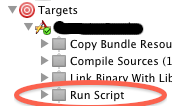
Picture 2: Project Target Settings
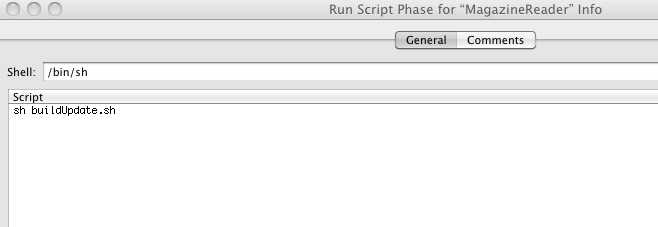
Picture 3: Insert Script Call
After a successful commit, the file “version.h” will look something like this:
#define APP_VERSION
[[[NSBundle mainBundle] infoDictionary]
objectForKey:@"CFBundleVersion"]
#define APP_EXECUTABLE
[[[NSBundle mainBundle] infoDictionary]
objectForKey:@"CFBundleExecutable"]
#define APP_NAME
[[[NSBundle mainBundle] infoDictionary]
objectForKey:@"CFBundleName"]
#define APP_BUILD_REVISION @"$Rev: 1047 $"
#define APP_BUILD_DATE @"$Date: 2011-01-21 18:53:38 +0100 (Fri, 21 Jan 2011) $"
#define APP_LAST_AUTHOR @"$Author: phaus $"
Code 4: updated version.h
You might modify the output (e.g. filter out the $s or reformat the date) to get a more stylish output.
Leave a Reply