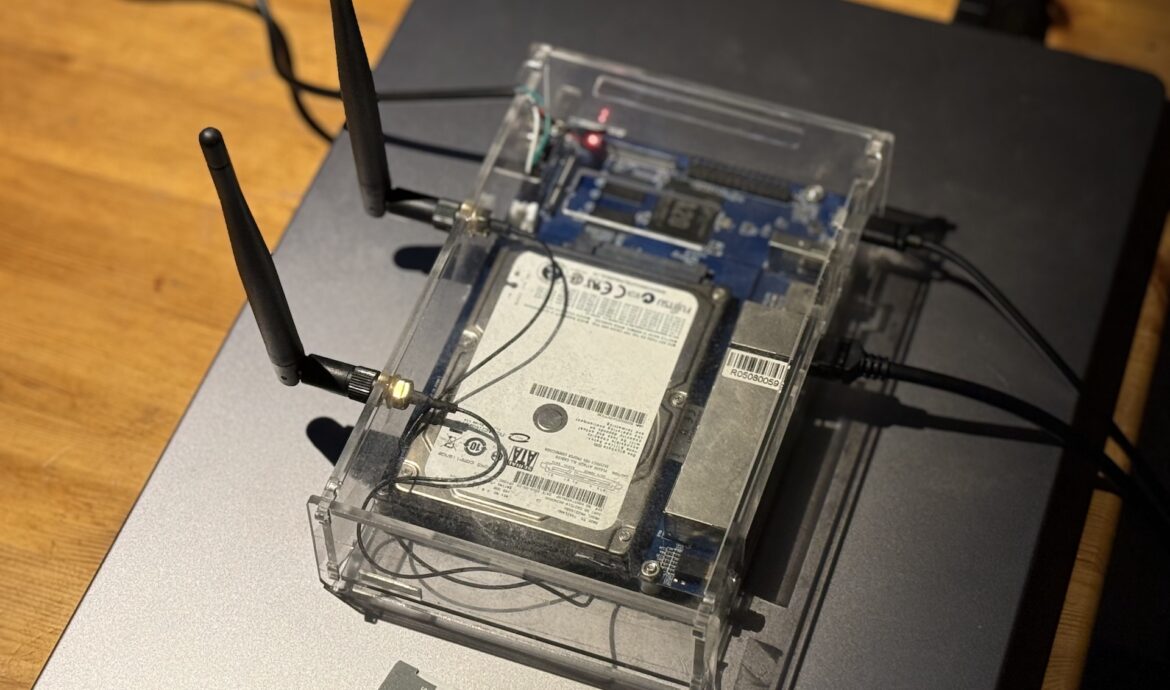
Running gokrazy on a Banana Pi BPI-R1
CLI . Go . Hacking . TestingMotivation
I had a BPI-R1 sitting in a drawer. The board is from 2014 — only ancient OpenWrt and outdated Armbian images exist for it. Nobody maintains this platform anymore.
The hardware is fine though: dual-core Allwinner A20, 1GB RAM, SATA, and a BCM53125 5-port Gigabit switch on the board. Not bad for a dedicated network appliance.
I’m a Go fan, and I knew about gokrazy — pure Go userland, squashfs root, no package manager. The BPI-R1 wasn’t supported. So I added it.
The Board
The BPI-R1 (aka “Lamobo R1”) runs an Allwinner A20 SoC — dual Cortex-A7 @ 1GHz, ARMv7, 32-bit. The standout feature is the BCM53125 switch with four LAN ports and one WAN port, managed by Linux’s DSA framework. That switch caused most of the trouble.
Device Tree — The Source of Truth
When porting gokrazy to a new board, the Device Tree Source in the mainline kernel is your primary reference. For the BPI-R1:
arch/arm/boot/dts/allwinner/sun7i-a20-lamobo-r1.dts.
This file tells you everything that matters:
- The model string is “Lamobo R1” — not “Banana Pi R1”, not “BPI-R1”. gokrazy uses this string from /proc/device-tree/model for device identification. Wrong string = nothing works.
- The Ethernet topology: DWMAC connected to BCM53125 via MDIO, five switch ports with their PHY addresses. This determines which kernel configs to enable.
- The serial console: UART0 on ttyS0, pins PB22/PB23 on the J13 header.
- The DTB filename: sun7i-a20-lamobo-r1.dtb — one of the build artifacts for the kernel package.
I had an old Armbian snapshot to cross-reference, but the DTS source is authoritative. Marketing names and wiki pages will mislead you.
Kernel and U-Boot
gokrazy’s kernel packaging is convention-based: put vmlinuz, DTB, boot.scr, and u-boot-*.bin into a Go module, and the packer finds them. I used gokrazy-rock64-kernel as a template.
The build scripts download mainline Linux 6.12.23 and U-Boot 2025.04, cross-compile in Docker, and copy the artifacts out.
Kernel config
Base: sunxidefconfig. Problem: it doesn’t include CONFIGSQUASHFS. gokrazy needs squashfs for its root filesystem. Without it:
Kernel panic - VFS: Unable to mount root fs on "PARTUUID=..."
My config addendum adds ~175 options. The critical ones:
- CONFIG_SQUASHFS=y — cost me an hour of debugging
- CONFIG_VFAT_FS=y, CONFIG_NLS_* — FAT32 boot partition
- CONFIG_NET_DSA=y, CONFIG_B53=y — BCM53125 switch
- CONFIG_CFG80211=y, CONFIG_MAC80211=y — WiFi stack (built-in)
- CONFIG_RTL8XXXU=m — WiFi driver (module, the old CONFIG_RTL8192CU staging driver was removed in kernel 6.12)
- CONFIG_CRYPTO_LIB_ARC4=y — mac80211 dependency, must be explicit
U-Boot
Straightforward: Lamobo_R1_defconfig, output is u-boot-sunxi-with-spl.bin. 32-bit ARM boots with bootz (not booti). SPL goes to sector 16 on the SD card, MBR-only.
Device Config
gokrazy needs to know the U-Boot offset on the SD card. This goes into deviceconfig/config.go:
"Lamobo R1": {
    MBROnlyWithoutGPT: true,
    RootDeviceFiles: []RootFile{
        {"u-boot-sunxi-with-spl.bin", 16 * sectorSize, 2032 * sectorSize},
    },
    BootPartitionStartLBA: 2048,
    Slug:                  "bpi_r1",
},
I forked gokrazy/internal, added the config, and rebuilt gok with a local replace directive. Works until the PR is merged.
Serial Console
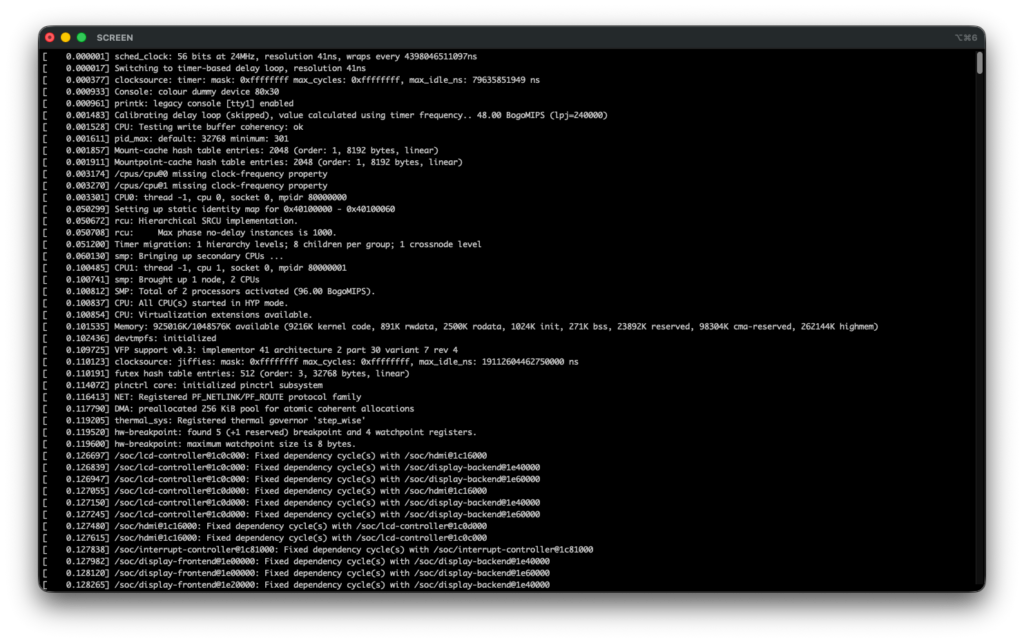
Without serial, this project would not have worked.
gokrazy is headless — no SSH by default, no shell. On a new board port, the network doesn’t work yet. Serial is your only way in.
The BPI-R1 has a UART header (J13). USB-to-serial adapter, screen /dev/tty.usbserial-111130 115200 on macOS.
Serial was essential at every stage:
- First boot: Seeing the exact kernel panic (squashfs not compiled in) instead of just a board that doesn’t come up.
- DSA debugging: Running ip link show to discover all switch ports were down, then ip link set wan up and udhcpc -i wan to manually test DHCP.
- WiFi bring-up: Loading kernel modules manually (insmod) to diagnose missing dependencies — libarc4, cfg80211, mac80211 load order.
- Iteration loop: Flash card, boot, read serial, identify problem, fix, repeat. About a dozen cycles, 5 minutes each.
One quirk: gokrazy starts a busybox shell when it detects serial input. The first character triggers the shell and gets swallowed. Type ip link show too fast and you get p link show. Wait for the
/ #
prompt.
DSA Networking
The board booted on the first try. But no network.
gokrazy’s DHCP client defaults to eth0. On the BPI-R1, eth0 is the DSA master interface — the CPU port of the switch. Traffic flows through the individual switch ports instead: lan1–lan4 and wan. All start DOWN.
3: eth0: ... state UP
4: lan2@eth0: ... state DOWN
7: wan@eth0: ... state DOWN
8: lan1@eth0: ... state DOWN
Fix: point DHCP at the port with the cable.
"PackageConfig": {
    "github.com/gokrazy/gokrazy/cmd/dhcp": {
        "CommandLineFlags": ["-interface=wan"]
    }
}
The DHCP client calls LinkSetUp() on the target interface automatically. Port comes up, DHCP lease obtained, web interface reachable.
WiFi
The BPI-R1 has an onboard Realtek RTL8192CU, connected via USB. Three things went wrong before it worked.
First, firmware. The rtl8xxxu driver needs /lib/firmware/rtlwifi/rtl8192cufw_TMSC.bin at runtime. gokrazy’s packer includes lib/modules/ from kernel packages — but not lib/firmware/. I patched the packer to also pick up lib/firmware/ when present. The firmware blobs themselves are architecture-independent — I copied them from an AMD64 host.
Second, module dependencies. I had cfg80211 and mac80211 as modules. Loading mac80211 failed: Unknown symbol arc4_setkey. It depends on libarc4.ko, which wasn’t loaded. gokrazy has no modprobe, only insmod — no automatic dependency resolution. Fix: build cfg80211, mac80211, and libarc4 as built-in (=y). Only rtl8xxxu.ko stays as a module.
Third, the old CONFIGRTL8192CU staging driver was removed in kernel 6.12. The replacement is CONFIGRTL8XXXU with CONFIGRTL8XXXUUNTESTED=y. The naming inspires confidence.
After all that, loading the module gives:
usb 3-1: RTL8192CU rev A (TSMC) romver 0, 2T2R, TX queues 2, WiFi=1
usb 3-1: RTL8192CU MAC: 10:a4:be:6b:1b:3b
usb 3-1: rtl8xxxu: Loading firmware rtlwifi/rtl8192cufw_TMSC.bin
usb 3-1: Firmware revision 88.2 (signature 0x88c1)
wlan0 appears.
Auto-loading at boot
gokrazy has no modprobe, no /etc/modules, no init scripts. So I wrote a small Go program — cmd/loadmodules — that calls finit_module(2) and exits. The module list comes from gokrazy’s CommandLineFlags in config.json:
"github.com/consolving/gokrazy-kernel-a20/cmd/loadmodules": {
    "CommandLineFlags": [
        "kernel/drivers/net/wireless/realtek/rtl8xxxu/rtl8xxxu.ko"
    ]
}
It writes to /dev/console so you can see it on serial:
loadmodules: kernel/drivers/net/wireless/realtek/rtl8xxxu/rtl8xxxu.ko: loaded
Exit code 125 tells gokrazy “don’t restart me”. If you have module dependencies, list them in order — it loads sequentially.
Result
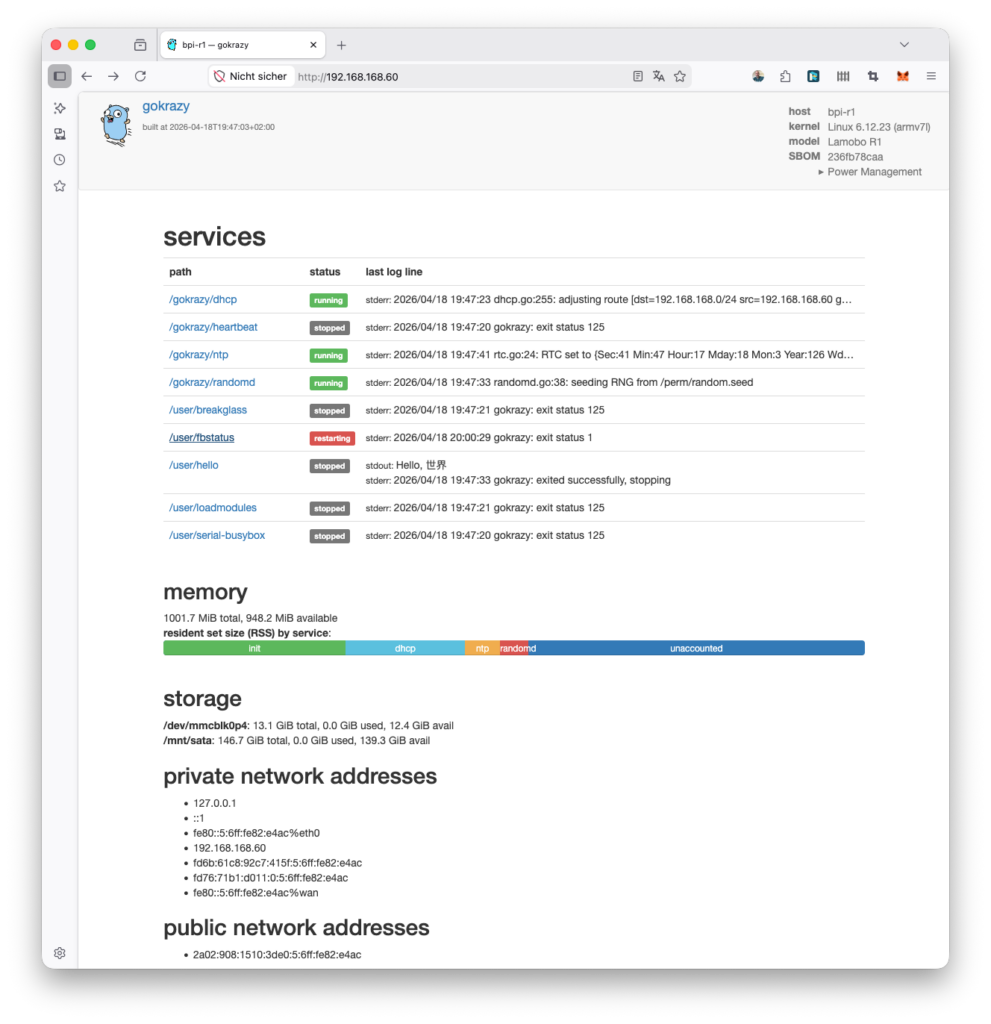
The BPI-R1 boots gokrazy in ~6 seconds. 5-port switch works via DSA. WiFi driver loads automatically at boot. Persistent storage on ext4. Hardware watchdog active. OTA updates and breakglass SSH both work over the network.
The kernel package is tagged v0.1.0 — no local hacks needed to build an image.
Takeaways
- Check what defconfig actually includes. sunxi_defconfig is minimal. It doesn’t have squashfs, WiFi, or other things gokrazy needs.
- DSA boards need per-port DHCP. The master interface isn’t where traffic flows.
- Read the DTS, not the wiki. The model string, peripheral wiring, and driver requirements are all in the Device Tree Source.
- Build WiFi stack dependencies as built-in on systems without modprobe. Module dependency chains break when you can only insmod.
- Firmware blobs are architecture- and kernel-version-independent. Copy them from any Linux host.
- Write a module loader, not a shell script. On gokrazy, a 70-line Go program with finit_module(2) replaces modprobe. Configure it via config.json like any other gokrazy package.
- Serial is non-negotiable for board bring-up. No serial, no debugging.
Code:
- consolving/gokrazy-kernel-a20 (v0.1.0)
- consolving/gokrazy-internal (branch add-bpi-r1-device-config)
- consolving/gokrazy-tools (branch feature/include-lib-firmware)
Leave a Reply