Fixing Issues after upgrading Proxmox 7 to 8
CLI . Network . ProxmoxMy initial plan was to update all of my Proxmox nodes to the latest version by the end of this year. While most updates proceeded smoothly, I encountered two errors on one particular node.
Given that updating servers is a critical operation, especially when they are only remotely accessible via the network, I decided to document these errors and their solutions for future reference.
Proxmox Host does not come online again, after the reboot due to an update
The first issue arose after the mandatory reboot; the server failed to restart. Upon requesting a remote console connection, the boot process stalled with the following error message:
Boot stuck on “A start job is running for Network initialization (XXm / no limit)”
After consulting various posts on the Proxmox forum, I initially suspected a need to update my network configuration. However, my attempts proved unsuccessful, leading to multiple reboots into rescue mode.
Fortunately, I had the insight to consult the official “Proxmox upgrade 7 to 8” guide, where I ultimately discovered the solution to my issue:
Network Setup Hangs on Boot Due to NTPsec Hook
It appears that a bug may lead to the simultaneous installation of both ntpsec and ntpsec-ntpdate. This, in turn, causes the network to fail during boot, resulting in a hang.
The resolution involves disabling the ntpsec-ntpdate start script using the command chmod -x /etc/network/if-up.d/ntpsec-ntpdate and then rebooting, successfully resolving the issue.”
A container does not start and shows the error
The next issues happens with some containers, that don’t want to startup anymore.
The Proxmox UI displays the following error:
run_buffer: 322 Script exited with status 255
lxc_init: 844 Failed to run lxc.hook.pre-start for container "105"
__lxc_start: 2027 Failed to initialize container "105"
TASK ERROR: startup for container '105' failed
After I started the container manually via the terminal, I got a more specific error:
root /etc/pve/lxc # lxc-start -n 105
lxc-start: 105: ../src/lxc/lxccontainer.c: wait_on_daemonized_start: 870 No such file or directory - Failed to receive the container state

lxc-start: 105: ../src/lxc/tools/lxc_start.c: main: 306 The container failed to start

lxc-start: 105: ../src/lxc/tools/lxc_start.c: main: 309 To get more details, run the container in foreground mode

lxc-start: 105: ../src/lxc/tools/lxc_start.c: main: 311 Additional information can be obtained by setting the --logfile and --logpriority options

root /etc/pve/lxc # lxc-start -n 105 -F

lxc-start: 105: ../src/lxc/conf.c: run_buffer: 322 Script exited with status 255

lxc-start: 105: ../src/lxc/start.c: lxc_init: 844 Failed to run lxc.hook.pre-start for container "105"

lxc-start: 105: ../src/lxc/start.c: __lxc_start: 2027 Failed to initialize container "105"

lxc-start: 105: ../src/lxc/conf.c: run_buffer: 322 Script exited with status 1

lxc-start: 105: ../src/lxc/start.c: lxc_end: 985 Failed to run lxc.hook.post-stop for container "105"

lxc-start: 105: ../src/lxc/tools/lxc_start.c: main: 306 The container failed to start

lxc-start: 105: ../src/lxc/tools/lxc_start.c: main: 311 Additional information can be obtained by setting the --logfile and --logpriority options
Trying to mount the container disk also produces some more errors:
root /etc/pve/lxc # pct mount 105
mount: /var/lib/lxc/105/rootfs: wrong fs type, bad option, bad superblock on /dev/loop17, missing codepage or helper program, or other error.
       dmesg(1) may have more information after failed mount system call.
mounting container failed
command 'mount -o noacl /dev/loop17 /var/lib/lxc/105/rootfs//' failed: exit code 32
So I initially though, that the filesystem might be corrupt, so I also did try to check it:
root /etc/pve/lxc # pct fsck 105
fsck from util-linux 2.38.1
/var/lib/vz/images/105/vm-105-disk-1.raw: clean, 373288/4194304 files, 8047185/16777216 blocks

[  713.133949] loop17: detected capacity change from 0 to 134217728
[  713.137988] ext4: Unknown parameter 'noacl'
The last info provided me with the right clue:
It seems, that with proxmox 8, that container config did change slightly. Re-setting the Disk ACL to default did eventually work.
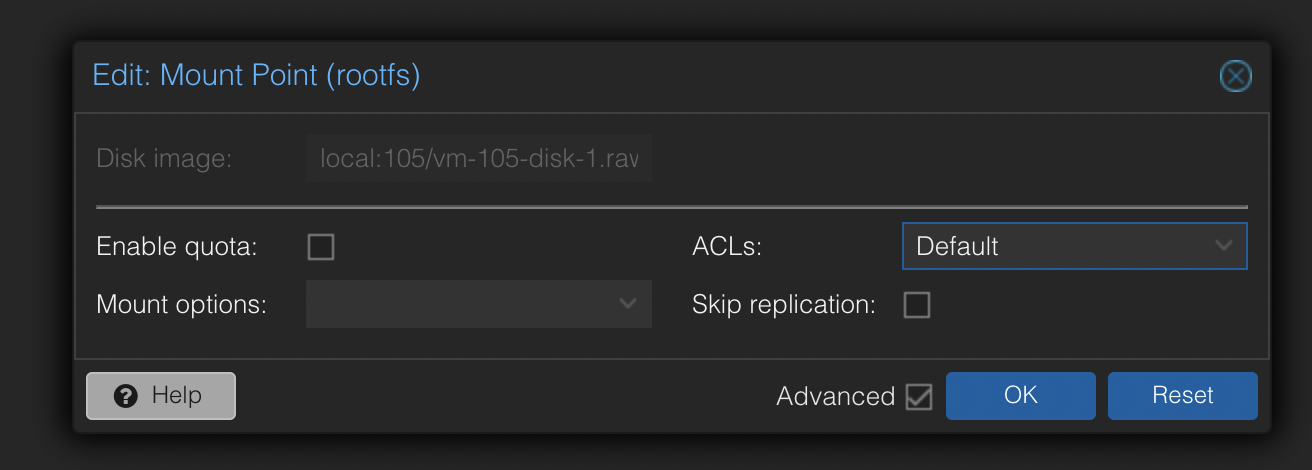
After that, the container was able to startup again
@philipp thanks for sharing!